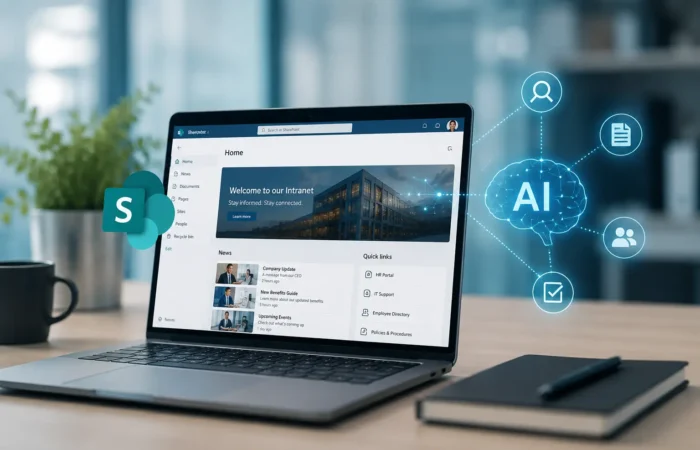
AI in SharePoint: What It Actually Means for Your Intranet in 2026
Every few years, SharePoint gets a wave of hype attached to it, and every few years, half of that hype

Looking for collaboration for your next project? Do not hesitate to contact us to say hello.

AI capabilities
AI by industry
Enterprise AI
Agentic AI
AI That Gets Work Done
Intelligent AI agents that plan, reason and execute workflows.
Computer Vision
See Beyond the Visible
Turn images and video into actionable intelligence.
Smart Glasses & AR
Intelligence in Your Sight
Hands-free guidance and real-time assistance for frontline teams.
SharePoint
Dynamics 365 ERP
Dynamics 365 CRM
MS Teams
Power Platform
Azure & Cloud
Microsoft Dynamics 365
Connect Every Business Function
Unify sales, finance, operations and customer relationships.
Microsoft Power Platform
Turn Ideas Into Action
Build apps, automate workflows and unlock business insights.
Azure & Cloud Solutions
Build Your Cloud Advantage
Modernize applications, data and infrastructure with Azure.
SERVICES
Design
Backend / Open source
Frontend tech
Mobile
Digital Marketing
At PSSPL, we don’t treat SharePoint as just another Microsoft tool. As a trusted SharePoint development company, we use it as a foundation for building connected, intelligent workplaces-where teams collaborate better, processes move faster, and information is always easy to find. Whether you’re starting from scratch, modernizing an existing setup, or scaling across departments, we help you turn SharePoint into a system that actually works for your business.
Our approach to SharePoint comes from years of working with the platform as it has evolved-from earlier on-prem environments to SharePoint Online and the broader Microsoft 365 ecosystem. That continuity matters.
Because building an effective SharePoint solution isn’t just about features-it’s about setting up the platform in a way that stays structured, usable, and scalable over time. Over the years, we’ve delivered 200+ SharePoint projects across intranets, enterprise portals, migrations, governance frameworks, and custom business applications. Most SharePoint projects aren’t isolated use cases. They involve a mix of architecture decisions, permissions, integrations, and user adoption challenges. We approach them as a whole-so the solution works in practice, not just on paper.
Much of our effort is in industries where governance and control are essential: Banks, health care, manufacturing, and professional services. In these sectors, SharePoint must do more than facilitate collaboration.
Our SharePoint environments are designed to be robust, secure, and manageable – able to withstand real-world scrutiny.
Permissions control who can open a file. Purview controls what happens to the data itself, wherever it travels. We configure it with your compliance team, aligned to your data classification scheme.
Label sites and documents by sensitivity, with encryption and access rules that stay attached when files are shared or downloaded.
Policies that detect sensitive information such as financial or health data and block or warn before it leaves approved locations.
Retention labels and policies that keep what you must keep, delete what you should not, and leave an audit trail for reviews.
SharePoint is no longer just sites and libraries. These are the newer Microsoft 365 capabilities we design and deliver around it.
Bring your SharePoint intranet into Microsoft Teams as a branded app with a dashboard, targeted news, and quick action cards, so employees reach company content where they already work.
Intranets designed around Teams for organizations that live there: connected SharePoint sites, a clear home site structure, and navigation that works on desktop and mobile.
Advanced document processing on top of SharePoint: models that extract data from contracts and invoices, automate classification, and reduce manual filing and review.
An API-first way to build document and file management into your own application, with content stored in your Microsoft 365 tenant and covered by Purview compliance controls.
Microsoft Copilot has made one thing clear-how your SharePoint is structured matters more than ever. Copilot pulls information directly from SharePoint, so if your content is disorganized or incorrectly permissioned, that’s exactly what it will surface.
The organizations benefiting from Copilot are those with well-governed SharePoint environments. All others need to focus on Copilot readiness as a governance issue before anything else.
As SharePoint continues to evolve, so does our work. We’re increasingly helping organizations prepare for AI-powered SharePoint environments, including Microsoft Copilot. That means structuring data, permissions, and content in a way that allows AI to deliver useful, accurate results-not noise. Our work here includes:
This entails a committed two to three week process, where we conduct a health check on your SharePoint environment to see how ready it is with respect to the Copilot criteria set by Microsoft. Areas such as permissions integrity, sensitivity labeling, data accuracy and freshness, overshare problems, and search settings are among those examined. What we deliver at the end of the day is a report with findings and recommendations organized in descending priority order – no selling to you to get another job down the line.
Let's talk: Send a messageGetting Copilot working correctly across your Microsoft 365 environment — ensuring it surfaces SharePoint content to appropriate users through correct permission boundaries, optimizing content organization for AI retrieval, and tuning search relevance so Copilot answers draw from current, accurate sources.
The Microsoft Copilot Studio platform enables creation of custom AI agents which leverage specific knowledge bases in SharePoint. Our agents assist employees in acquiring information from the organization’s documentation – HR policies, technical wikis, project histories, or product documentation, without the necessity to navigate to SharePoint and perform searches that come up with twenty hits for a question requiring only one.
The Microsoft Search in SharePoint acts as the backbone for both the manual search and the Copilot search. We configure the search schema, result source, query rule, promoted results, and vertical configurations. A properly configured search experience enhances the results obtained by users who manually search and those provided by Copilot when asked questions.
The structural work that makes AI tools useful — reorganizing content, improving metadata coverage, implementing consistent content types, and eliminating the classification inconsistencies that cause AI tools to return confusing or inaccurate results.



As a SharePoint development partner, we build solutions that help teams collaborate better, manage content efficiently, and streamline everyday workflows. Our approach combines upfront consulting with hands-on development, so what we deliver isn’t just functional – it fits your structure, scales with your needs, and integrates smoothly with your existing systems.
We help you plan your SharePoint environment with the right structure from the start-covering architecture, governance, and scalability. This ensures your platform doesn’t become cluttered or difficult to manage as it grows. Our focus is on aligning SharePoint with how your teams actually work, not forcing processes to fit the tool.
We develop bespoke SharePoint solutions which cater to your company’s processes, whether you need an intranet, document management system, or any other internal application. Our solutions are user-friendly while remaining highly customizable and scalable on the backend.
SharePoint functions best as an interconnected system. Integrating it with Microsoft 365, Teams, Power Platform, and other enterprise systems is the key to seamless data management within the enterprise. It facilitates the breaking down of silos within the digital workplace environment and accelerates digital transformation by connecting people, processes, and data across the organization.
We will assist you in migrating to SharePoint Online from your legacy system or from previous versions of SharePoint. Our services don’t end at migration; we ensure that your SharePoint Online environment is not only migrated but also optimized.
When off-the-shelf SharePoint does not meet your needs, we build on top of it. From custom UI elements to workflows and web parts, we customize the software for you. Our aim is to enhance usability without compromising performance or maintainability.
We help you prepare SharePoint for AI-driven experiences using Microsoft Copilot and related tools. This includes structuring data, permissions, and content so AI can deliver meaningful insights, faster search, and smarter automation across your environment.
See Copilot & AI ImplementationPartnering with a trusted SharePoint Development Company like Prakash Software Solutions Pvt. Ltd opens doors to enhanced productivity and collaboration. Our team, well-versed in SharePoint's capabilities, is committed to tailoring solutions that seamlessly integrate with your business processes. With a focus on security and scalability, we ensure your organization leverages SharePoint to its fullest potential. Together, we empower your business to thrive in the digital age.
Look no further! Team up with PSSPL, your Microsoft SharePoint Consultant with a team of highly skilled consultants who are experts in harnessing the power of SharePoint. With their deep knowledge and local presence, they can provide tailored solutions to meet your organization’s unique needs.
Contact us today to leverage the expertise of our SharePoint consultants near you.
Explore how we’ve helped businesses build SharePoint solutions that support growth, maintain structure, and keep governance in place.
We built a SharePoint-based project management setup with Microsoft Copilot to automate reports and surface key insights. Teams no longer had to spend hours pulling updates together-they could focus on decisions instead. This also helped standardize reporting across projects, making updates more consistent and easier to track.
We developed an interactive image mapping solution integrated with SharePoint to manage and present visual content more effectively. It made content easier to explore and significantly improved how users interacted with it. Users could navigate complex visuals more intuitively, reducing the time needed to find relevant information.
We designed a SharePoint-based document management system along with a custom intranet tailored for validation workflows. Documents became easier to find, manage, and audit-reducing delays and improving overall control. The system also brought better version control and traceability, supporting smoother compliance processes.
We created a connected SharePoint and Microsoft Teams environment where communication, documents, and workflows sit in one place. This reduced back-and-forth across tools and helped teams work more smoothly together. It also improved visibility across teams, making it easier to stay aligned on tasks and updates.
We’re direct about what we work with because vague claims about “cutting-edge technology” don’t help you evaluate whether we’re the right fit.
SPFx (SharePoint Framework) PnP Core SDK PnP PowerShell React Controls
TypeScript C# JavaScript PowerShellSaas
React JS Adaptive Cards Fluent UI
SharePoint Online Microsoft 365 Microsoft Teams Copilot Studio Azure
Microsoft Graph API Azure AD / Entra ID REST APIs Power Platform connectors
SMTP Sharegate Microsoft 365 Admin Center
Playwright (end-to-end) Jest (unit) SonarQube (code quality)OWASP (security)
No project starts with a fixed scope document and ends six months later with a demo you never asked for. Our engagements typically run like this:
Week 1 to 2
We invest our time in understanding your organization’s real structure rather than relying on a simple organizational chart. This involves communicating with the end users rather than just the IT stakeholders. The individuals who will use the SharePoint environment on a daily basis can provide valuable insight regarding the shortcomings of existing systems.
Week 2 to 3
We give our proposal for information architecture, draft governance, and technical solution. You review it. We perfect it. We don’t start development until you’re sure about the path we take.
Iterative
Iterative builds with periodic check-ins. Working software at your disposal at periodic intervals – not just when we’re done with everything.
Before launch
Our tests against acceptance criteria are done through automated testing using Playwright and Jest and structured user acceptance testing. Security testing through OWASP is part of the custom development process.
Launch
Phase-wise deployment with training for the users, administrators’ documentation, and structured hypercare period. Staying hands-on for the first few weeks after the launch.
After launch
Service-level agreement-driven support from the actual makers of the environment rather than support staff looking at the documents for the first time.

Our experience working with PSSPL has been consistently smooth and positive. From technical expertise to attention to detail, they’ve earned their place as a trusted partner for our technology initiatives, the kind of team you don’t have to double-check.

What sets PSSPL apart is how quickly they grasp our requirements and translate them into results. Their collaborative style and dependable support have taken a lot of friction out of project execution on our end.

Throughout our engagement, PSSPL has proven to be a dependable partner who genuinely understands our needs. Clear communication, professionalism, and a sharp eye for detail define how they work.

PSSPL brings a practical, hands-on approach paired with genuine technical depth to every project we’ve worked on together. What stands out most is their responsiveness. The team stays focused on delivering solutions that actually fit our needs, not just what’s easiest to build.

PSSPL’s professionalism and technical know-how have made a real difference for us. They’re responsive, easy to collaborate with, and clearly invested in understanding our requirements before proposing solutions, not after.

PSSPL has proven to be a valuable technology partner across our projects. A knowledgeable team, responsive communication, and a consistent focus on quality have made for a smooth, productive collaboration from start to finish.
Build a focused, long-term team of PSSPL engineers, architects, and domain specialists who work exclusively on your initiatives. This model ensures continuity, deep domain understanding, and scalable delivery for complex programs.
Ideal for projects with clearly defined scope, deliverables, and timelines. This model offers budget predictability and milestone-based execution with minimal risk.
A flexible engagement model where you pay only for the time and expertise utilized. Best suited for projects with evolving requirements or phased delivery.
PSSPL has been delivering SharePoint solutions for clients in banking, healthcare, manufacturing, and professional services since 2010. Microsoft Partner with delivery experience across India, UK, US, Middle East, and Asia-Pacific.
Most vendors will not tell you until after a call. Here are indicative ranges from our 2026 cost guide, so you can budget before you talk to anyone.
From a basic intranet with document libraries, news, and light collaboration, up to a mid-market build with custom workflows, integrations, and departmental sites.
Basic: $10K to $30K
Mid-market: $40K to $150K
Moving content from legacy systems or older SharePoint versions. Clean, well-structured content moves faster and costs less; scattered content with heavy customizations costs more.
CData migration phase · rises with complexity
Custom web parts, workflows, and integrations with CRM, ERP, and other systems. Scope and number of integrations drive most of the variation.
Custom development and integration phase
Ranges are indicative and exclude ongoing support. Microsoft 365 licensing, number of users, and integration needs change the final figure. Every project is scoped and quoted individually.
Read the full SharePoint development cost guide.
Need to add capacity rather than outsource a whole project? Bring in the specific role you are missing, on a dedicated or time and material basis.
Builds custom web parts, extensions, and Teams and Viva apps on the SharePoint Framework using TypeScript and React.
Best For
Custom web parts, modern intranet features, Teams and Viva Connections extensions
Builds custom web parts, extensions, and Teams and Viva apps on the SharePoint Framework using TypeScript and React.
Best For
New intranets, governance design, hybrid and Purview planning, architecture reviews
Builds apps and automations with Power Apps, Power Automate, and Dataverse, connected to your SharePoint data.
Best For
New intranets, governance design, hybrid and Purview planning, architecture reviews
Plans and runs moves from SharePoint 2016, 2019, and earlier to Subscription Edition or SharePoint Online, including the rebuild of customizations.
Best For
2016 and 2019 end-of-support projects, tenant consolidation, content cleanup and cutover
Tell us the role, the skills, and the date you need someone in seat. We confirm availability and share matching profiles after the first call, and you can interview before you commit. Available through our dedicated team and time and material models.
Both SharePoint Server 2016 and 2019 are now out of support. If your farm is still running on either one, the question is no longer whether to move, but where to and in what order.
It left support in 2023, so the same path applies with more urgency. Not sure which version you are running? Send us a message and we can help you find out. Contact Us
There are two supported destinations. The right one depends on your data, your customizations, and how much of your estate you want Microsoft to run for you.
We help organizations build SharePoint solutions that actually support how their teams work-making collaboration easier, processes smoother, and systems easier to manage over time. From early planning and setup to development and ongoing support, we stay involved throughout. The goal is simple: deliver something that works well now and continues to scale as your needs grow.
As a Microsoft Solutions Partner, we work closely within the Microsoft ecosystem, building solutions across SharePoint Online and Microsoft 365. Our experience across industries helps us design systems that aren’t just technically sound-but practical for real business use.
Every project is different. Some teams need full end-to-end delivery, while others need support on specific parts of their SharePoint environment. We adapt to how you prefer to work-without adding unnecessary complexity.
We handle everything from initial setup and customization to integrations and enhancements. You don’t have to coordinate across multiple vendors-we take care of the full solution.
We keep things structured but straightforward. Clear planning, consistent communication, and a focus on getting things right the first time-so there are no surprises later.


It is not always the SharePoint Development Company with the largest size that is the best, but rather it is one which has an established reputation regarding the timely delivery of projects, a clear price range, and certifications of its SharePoint/Microsoft 365 experts. Seek out companies with Microsoft Partner status, relevant project experience, and reference calls. At Prakash Software Solutions Pvt. Ltd., we've been a Microsoft Partner for years and we can provide case studies across intranet, migration, and custom app work. Happy to walk you through a few that match your industry.
Below are some of the best players providing SharePoint Development Services:
The correct one would still depend on the size and budget of your project – but for most SMBs and midmarket organizations seeking practical SPFx development experience and genuine post deployment support, PSSPL is the best option to start off with. It is certainly worth shortlisting 2-3 firms from the above list and comparing their case studies and responsiveness in costing before deciding.
Some of the things matter more than having a fancy portfolio: having experience with SPFx and Power Platform (as opposed to “box” SharePoint), having a migration/upgrade strategy, providing post-go-live support, and having experience implementing solutions with that particular scenario — intranet, document management, workflows, you name it. Another good thing to ask is how they approach governance/security right from the beginning of the project rather than bolting it on later.
SharePoint is a flexible platform that supports everything from document management to collaboration and workflow automation. Here are some of the features teams use most:
(1) Document management
Store all your files in one place and manage them easily with versioning, permissions, and structured folders.
(2) Collaboration tools
Work together through shared spaces, team sites, calendars, and task lists—so everyone stays aligned.
(3) Workflow automation
Automate routine tasks like approvals, notifications, and document routing to save time and reduce manual work.
(4) Smart search
Quickly find documents, people, or information across your organization without digging through folders.
(5) Access control and security
Decide who can view, edit, or share content with detailed permission settings.
(6) Content management
Organize, manage, and publish content in a way that stays structured as your data grows.
(7) Seamless integration
Connect with Microsoft 365 tools like Teams, Outlook, and Power Platform, as well as other business applications.
(8) Version history
Keep track of changes, restore earlier versions, and maintain a clear record of document updates.
(9) Mobile access
Access your SharePoint sites and documents on the go from any device.
(10) Built-in analytics
Get insights into usage, activity, and content performance with reporting tools.
(11) Ready-to-use templates
Start quickly with pre-built site templates that you can customize based on your needs.
We hear this often. In many cases, the solution works technically, but teams don’t use it because user needs weren’t properly understood or governance wasn’t set up correctly. We can review what has been built, and we'll let you know what parts are good and should stay and what parts need to be changed.
Yes. This has been done multiple times. The process begins with an assessment of what is currently there, what is working, and the reality of the situation regarding the code and configuration. We assess the existing situation before making any changes. After that comes a discussion of realistic options.
Absolutely — SharePoint Server 2016, 2019, and Subscription Edition. We provide support for hybrid scenarios as well as migrations from on-premises to SharePoint Online. In case your organization uses SharePoint Server 2013, it is time to discuss the matter of support end.
We deploy SharePoint Online inside Microsoft 365 Multi-Geo environments when residency requirements come into play. The sensitivity labels and compliance boundaries can be tailored to fit the data classification system that applies to your geographical location.
We serve clients ranging from about 200 to 50,000 users. What works changes depending on the scale involved. There is a difference between what an organization with 500 people needs versus one with 20,000 employees in the context of SharePoint requirements. We tailor our approach accordingly, not by offering the same product at various prices.
Yes. It’s an engagement that will take two to three weeks and result in a report. You don’t have to commit to further work on the implementation front. The report is written in such a way that it can be actioned either by us or another service provider/vendor.
Adding {{itemName}} to cart
Added {{itemName}} to cart