
Migrating from Microsoft Dynamics GP to Dynamics 365 Business Central: A Complete Guide
Summarize and save time
Your ERP may still be working, but is it ready for what’s coming next? With Microsoft Dynamics GP closing in on the end of its support, businesses need to start thinking about more than keeping their current systems running.
For businesses mainly focused on European markets, the move can also involve considerations such as local tax requirements, multiple currencies, and different regulatory needs. Dynamics 365 Business Central provides a modern, cloud-based path forward, but transitioning requires proper planning, a timeline, and effective employee training.
Before exploring the migration process, let’s understand why businesses are moving away from GP and what makes Business Central a natural step ahead.
What is Microsoft Dynamics GP?
Microsoft Dynamics GP, also known as Great Plains, is a trusted on-premises ERP solution created for small and medium-sized businesses (SMBs). The platform has been in use for over two decades. Dynamics GP has been widely recognised for its accounting capabilities and strong financial management. It has been the first choice for organisations seeking a trustworthy and structured system to manage the general ledger, payables, receivables, and payroll.
Microsoft Dynamics GP also specialises in basic functionalities when it comes to project accounting, supply chain operations, human resources, and inventory management. To this day, many businesses continue to use the platform to support their day-to-day operations. As technology advances and businesses move toward cloud-based operations and automation, the limitations of Dynamics GP are becoming more noticeable.
Why Dynamics GP May No Longer Be Enough
Dynamics GP continues to handle everyday business operations efficiently, but it may begin to fall short as companies expand and rely more on cloud-based tools. Here are some of the common challenges faced by Dynamics GP:
- Limited scalability: Business growth would require additional infrastructure and upgrades.
- Complex updates: Updates and customisations can consume considerable amounts of time and IT effort.
- Integration issues: Connecting GP with tools like Power BI, Microsoft 365, and AI-enhanced automation isn’t easy and requires more resources and IT effort.
- Less flexible remote access: Remote access is available, but it isn’t as seamless as a cloud-native ERP.
What Staying on Dynamics GP Could Mean for Your Business
Staying with Dynamics GP for too long can make daily business operations harder and more expensive. As Microsoft phases out support, businesses might need to deal with outdated tax rules, fewer security updates, limited technical support, and rising IT costs.
The longer the move to Business Central is delayed, the harder it can become to keep systems safe, seamless, and ready for evolving business needs.
Businesses might face:
- Outdated tax and regulatory updates after 2029
- Higher security risks once updates end in 2031
- Less support from Microsoft
- More dependence on IT teams or third-party providers
- Increasing maintenance and infrastructure costs
- Greater compliance and audit concerns
- Difficulty connecting with newer systems, applications, and AI tools
If your business needs a more flexible, seamless, and connected ERP, Dynamics 365 Business Central is a go-to cloud-ready alternative.
What Makes Business Central a Natural Next Step?
Dynamics 365 Business Central is a cloud-based ERP designed to help organisations manage finance, sales, inventory, supply chain, and other important functionalities all in one place.
The platform works closely alongside the Microsoft ecosystem, making it easier to connect business data and everyday tools.
For businesses moving beyond Dynamics GP, Business Central offers:
- Cloud-based access: Access to secure and sensitive business data from anywhere without maintaining on-premises infrastructure.
- Scalable operations: Add users, processes, and capabilities as the business expands.
- Automatic updates: Get regular updates and new features without handling major upgrades manually.
- Connected Microsoft tools: Work with Microsoft 365, Power BI, Teams, and Power Automate from a connected environment.
- Automation and AI: Reduce manual work and use built-in AI capabilities across areas such as finance, inventory, and reporting.
With Business Central, businesses can reduce IT maintenance, streamline operations, and work with an ERP platform that can adapt to evolving business needs.
Why Are Businesses Increasingly Moving Towards the Cloud?
By moving to the cloud, businesses can:
- Scale operations up or down easily to meet changing business requirements and reach new heights.
- Lower infrastructure expenses with the help of automatic updates and maintenance.
- Expand functionality and integrate with the latest apps without requiring extensive customisation.
- Benefit from empowered security, remote access, and disaster recovery.
Core Benefits of Migrating to Dynamics 365 Business Central
Dynamics 365 Business Central brings a variety of business and technology benefits to the table. Let’s explore some of the core ones.
- Enhanced user experience: The platform comprises a modern, cloud-native interface that streamlines navigation and usability for both technical and non-technical audiences. This helps reduce training time and boosts overall user adoption.
- Scalability and flexibility: Business Central is designed in such a way that it scales as your business grows. It lets you add new users, expand operations, and integrate more features without the limitations of on-premises systems.
- Advanced reporting and analytics: By integrating Power BI and built-in business intelligence tools, organisations gain crucial insights into key financials, inventory, and operational data. This leads to better data-centric decision-making.
- Cloud accessibility: Business Central allows users to access data from anywhere, on any device. This promotes seamless remote working capabilities and mobile accessibility.
- Cost-effective: With no on-premises infrastructure to manage, Business Central can effectively cut down IT costs while handling updates, security patches, and new features automatically.
When Does Dynamics GP Support End?
Microsoft is gradually phasing out Dynamics GP support. The system will continue to work, although businesses will receive fewer updates and less support over time.
By December 2029, Dynamics GP will no longer receive new features, tax and regulatory updates, service packs, or technical support. After April 30, 2031, security updates will also end, leaving businesses responsible for maintaining and securing their systems.
Key Dynamics GP dates:
- April 1, 2025: New perpetual licence sales ended
- April 1, 2026: New subscription licence sales ended
- December 31, 2029: Product updates, regulatory updates, service packs, and technical support end
- April 30, 2031: Security updates end, and Dynamic GP reaches end of life
The Dynamics GP to Business Central Migration Process
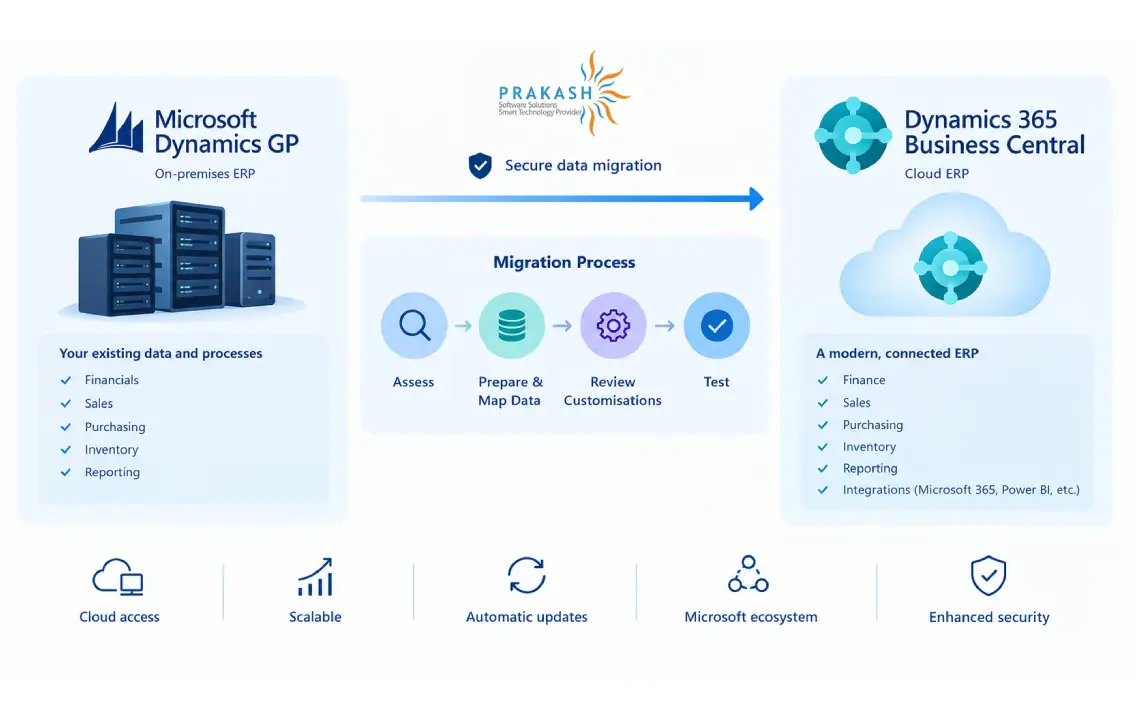
Making a move from Dynamics GP to Dynamics 365 Business Central isn’t just about transferring data from one system to another. A successful migration involves various processes such as reviewing existing workflows, preparing data, addressing necessary customisations, testing the new environment, and helping employees adapt.
Businesses can also work alongside an established Microsoft partner to efficiently oversee and manage the transition. One such leading firm is Prakash Software. They provide a variety of services, including Dynamics GP to Business Central migration, implementation, customisation, integration, and ongoing support. Their approach is straightforward: first they assess and comprehend existing GP environments, and then prepare and migrate data. Alongside this, they adapt relevant customisations and configure Business Central around your operational needs. Let’s take a closer look at the migration process.
Step 1: Evaluate your current Dynamics GP Environment
Start by reviewing your existing Dynamics GP setup to understand what needs to be improved.
- Review core workflows, including finance, sales, purchasing, inventory, and reporting.
- Identify existing customisations, integrations, and third-party apps.
- Assess the quality and relevance of your current data.
- Identify processes that can be streamlined or replaced with Business Central’s standard capabilities.
This assessment helps define the scope of the migration and prevents unnecessary customisations from being carried into the new system.
Step 2: Prepare and map your data
Data preparation is one of the most important parts of the migration process. Determine what data needs to be transferred and how it will fit into Business Central.
- Clean outdated, duplicate, or inaccurate records.
- Discover essential customer, vendor, financial, inventory, sales, and purchasing data.
- Map Dynamics GP fields to their corresponding Business Central fields.
- Review relationships and dependencies between different records.
- Decide whether historical data should be migrated in full or retained separately for reference.
Data preparation should also account for local tax, currency, and reporting requirements where applicable.
With the help of proper data mapping and validation, data is maintained accurately, and issues are reduced post-migration.
Step 3: Review customisations and integrations
It’s not necessary to recreate every customisation available in Dynamics GP when it comes to Business Central. Wherever possible, replace legacy customisations with Business Central’s standard features, extensions, workflows, or integrations. This keeps the new environment easier to maintain and ready for the cloud.
Step 4: Configure, test, and validate Business Central
Once the data and requirements are defined, configure Business Central according to your business processes and migration goals. Before going live:
- Ensure testing of migrated data for accuracy and completeness.
- Validate financial balances and key transactions.
- Test integrations, workflows, and critical business processes.
- Conduct user acceptance testing.
- Run a pilot or test migration to discover issues early.
Thorough testing helps reduce the risk of data errors and operational disruption while going live.
Step 5: Train users and prepare for going live
Successful migrations also depend on user adoption. Employees familiar with Dynamics GP may need time to comprehend the new interface, workflows, and processes in Business Central.
Offer role-based training for finance, sales, inventory, and other departments. Give users opportunities to work in a test or sandbox environment before going live, and communicate any changes to their day-to-day processes in advance.
Step 6: Go live and provide ongoing support
Once the testing and training are completed, move to the Business Central environment according to the agreed migration plan. Where possible, schedule the final migration during a low-activity period to minimise any disruptions.
Once it’s live:
- Monitor system performance and data flows.
- Resolve user issues quickly.
- Validate key business procedures.
- Take note of employee feedback.
- Fine-tune workflows and configurations where necessary.
Ongoing support helps employees settle into the new system and ensures the organisation gets the full value of Business Central.
Common Migration Pitfalls and How to Avoid Them
By making a transition from Microsoft Dynamics GP to Microsoft Dynamics 365 Business Central, your business will automatically gain access to various advantages. However, planning poorly can lead to delays, unnecessary extra charges, and data problems. Here are some of the most common challenges businesses run into.
Starting out without a proper plan ahead
A migration consists of data, timelines, people, and business processes. Without a proper plan, teams can miss essential steps or run into avoidable delays.
Here’s how you can avoid it:
- Create a migration roadmap with key milestones, timelines, and responsibilities.
- Work with an experienced Microsoft partner familiar with Dynamics GP migrations.
- Start with a pilot migration to test the process and discover issues early on.
Overlooking data migration complexity
Moving years of financial, customer, vendor, and inventory data takes more than simply transferring records. Old, duplicate, or inconsistent data can create problems in the new system.
How to avoid the same:
- Review and clean data before migration.
- Map GP data carefully to Business Central.
- Validate data before and after the migration to find errors.
- Remove outdated or duplicate records where they are no longer required.
Not preparing employees for the change
A new ERP system changes how employees perform their everyday tasks. Without proper training and communication, users may struggle to adapt or continue relying on old processes.
How to avoid it:
- Provide role-based training before and after going live.
- Explain how Business Central will affect daily tasks.
- Offer ongoing support as employees get familiar with the new system.
- Identify key users within your organisation who can support their teams and help employees adapt to Business Central.
Conclusion
There’s more to shifting towards Dynamics 365 Business Central than simply replacing an ERP system. It is a chance to modernise operations, simplify processes, and create a more future-ready, scalable foundation for growth. However, the success of the transition depends on planning the migration carefully, from data preparation and customisation reviews to testing and user training. Getting a head start helps organisations avoid last-minute roadblocks and make the move to Business Central smoother and more confident.
With 7+ years of experience in Microsoft Dynamics 365 Business Central, working across development, technical architecture, and client support has provided hands-on experience with real-world business and technical challenges. A strong interest in technology drives a continuous focus on understanding how things work and finding practical solutions.
Working closely with Business Central projects and client requirements has also helped build a strong understanding of the platform and its capabilities. Informative content focuses on sharing practical knowledge, simplifying technical concepts, and making Business Central topics easier to understand and apply.