
Meta Muse for Business: Put the Agent to Work
Summarize and save time
Muse can already send an email, manage your calendar, shop online, and book travel or appointments. For organizations, Meta Muse for Business is less about daily operations and much more about what it can access: work orders, room status, claims, and more. Let’s see how connectors and AI glasses make it possible, plus what you can start piloting this quarter.
In a nutshell:
- Muse was launched in the United States on September 8, 2026. It is free to start, with $20 and $100 monthly plans.
- Meta has opened connectors to outside developers. That is the door your own systems go through.
- It is coming to Meta’s AI glasses in a few months.
- However, you don’t have to wait; a custom agent on Meta glasses can run a pilot today with a named group of staff.
The majority of coverage of Muse focuses entirely on whether people will trust Meta when it comes to shopping, sending emails, and handling tasks for them. Even though it’s a fair question, businesses need to ask something more practical.
Is Meta Muse compatible with your business systems? And can these systems be accessible and ready to use while moving? That’s where custom AI agents and AI glasses apps make things possible. Our experts at Prakash can build custom AI agents and connect them seamlessly with your business systems. They can also connect AI glasses apps for people who don’t work at a desk. This blog breaks down how they collaborate. And follows up with three connectors we built.
How Muse Goes Beyond Chat?
How different would an AI assistant feel if it could get the work done? That’s what Muse is all about. It was rolled out by Meta on September 8, 2026. This personalized AI agent can send emails, organize your schedules, book travel, fill out forms, negotiate bills, and make purchases. And it continues to work even after you close the app.
Muse runs on Meta’s Muse Spark model inside a dedicated VM with its own browser. You connect your apps at a time, and Muse asks for approval before taking an action. As of now, it’s available in the United States on Android, iOS, and muse.ai, with a free tier, a 20$ per month plan, and 100$ per month plan.
Where Muse Stands Today?
Launch dates can change. Here’s the current picture on the basis of Meta’s latest announcements and the Connect event that took place on September 23.
| Feature | Current Status | What It Means for Businesses |
|---|---|---|
| Muse on iOS, Android, and web (US) | Live | Individuals or teams can leverage it now for email, scheduling, and forms. |
| Built-in email, calendar, payments, and shopping | Live | Useful for routine tasks, but doesn’t connect to your internal business systems- not just yet. |
| Third-party connectors | Applications open | Could connect Muse to systems such as ERP, PMS, and claims platforms. In the very first week itself, more than 1,500 applications were submitted. |
| Muse controlling Mac apps | Announced | Could allow Muse to work with desktop apps or tools that don’t have an API. |
| Muse’s own email address | Coming soon | You can forward an email to Muse and let it handle the task. |
| Muse on Meta AI glasses | Coming in the next few months | Could bring hands-free AI assistance to field and frontline work. |
| Third-party connectors on glasses | Not confirmed yet | Meta hasn’t made a comment yet on whether or not glasses will use the same business connectors as the phone app. |
How Do Connectors Function?
A connector is like a secure doorway in a business system. It tells the AI agent what it can do, what information it requires, and what outputs it shall return. The agent doesn’t log in as an employee or have complete access to the database. It only gets access to the specific actions you approve. The end goal is to decide what an agent can get done on its own and where human intervention is necessary when it comes to approvals.
Looking for an agent for your ERP, PMS, or claims system needs?
Our experts design the actions, permissions, and necessary approval steps, then develop the agent, and then finally execute test runs against your real data.
Three Connectors to Start With
These are based on workflows we have already developed for automotive service, insurance, and hotels. Each one showcases what Muse is capable of handling, what it needs access to, and where human approval should stay in the loop. Select a tab to check out.
Repair Orders:
Automotive specialists spot worn brake pads or any other necessary defects and create a quick clip. These are added to the right repair order by the agent. The agent also drafts a message for the customer in the meantime.
| Agent may | Person approves or agent never does |
|---|---|
| find_open_repair_orders for a bay or VIN | Sending the approval to the customer (advisor approves) |
| attach_media to a repair order line | Changing prices or labour times |
| draft_customer_approval with price from the DMS | Closing a repair order |
Hospitality: room status connector
A hotel maintenance admin spots a loose towel rail and reports it immediately. The agent would then update the same in the PMS and raise a maintenance ticket. The front desk would be known about the same once the room is ready.
| Agent may | Person approves or agent never does |
|---|---|
| get_room_status for a floor | Marking a room inspected and ready (supervisor) |
| mark_room_cleaned (supervisor inspects) | Reading guest names, folios or payment data |
| create_maintenance_ticket with a photo | Moving or cancelling reservations |
Insurance: claims evidence connector
An adjuster photographs a badly damaged car, and the agent sorts these photos into the right claim, flags anything that might be missing, and drafts a damage summary.
| Agent may | Person approves or agent never does |
|---|---|
| add_evidence with a file hash at capture | Submitting the summary (adjuster signs off) |
| list_missing_angles for the claim type | Setting or changing reserves |
| draft_damage_summary for the adjuster | Approving any payout |
Muse on AI Glasses
When it comes to using Muse on a phone, it can do wonders. While on glasses, its potential becomes limitless. Its built-in custom AI agent can hear the owner, see what one’s looking at, and act while one’s equipped with a task.
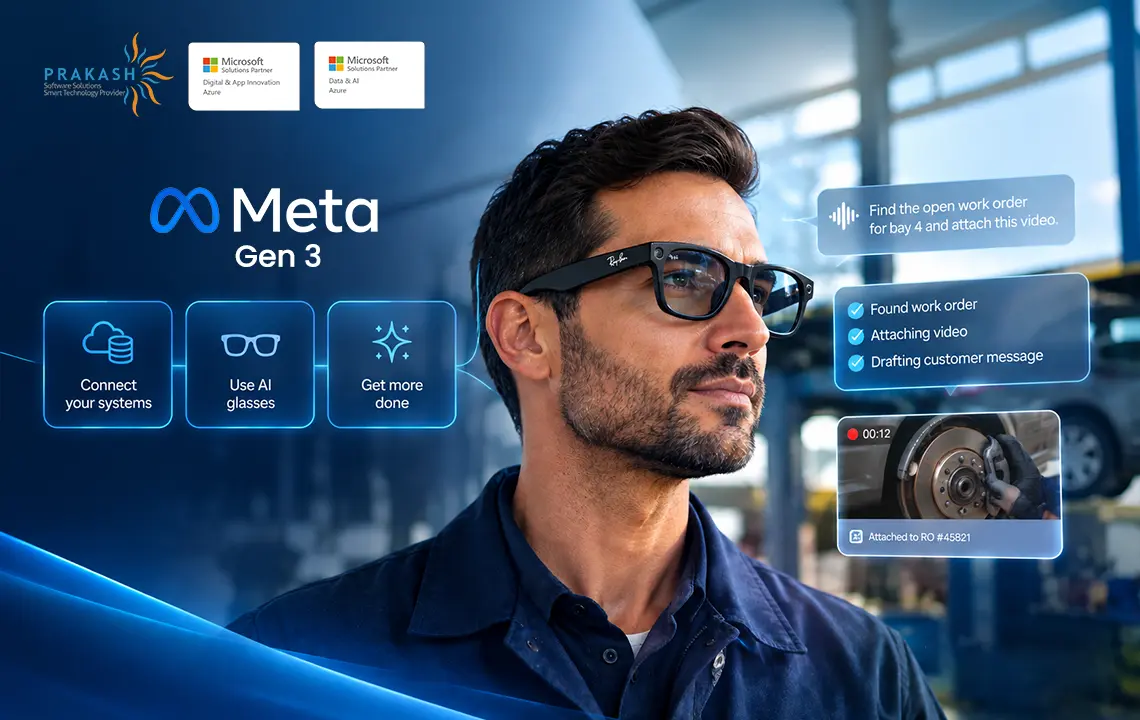
At Connect, Meta said Muse on glasses would wake up to a command and could help with tasks such as booking an appointment and shopping. Now picture the repair order connector above running on a pair of Ray-Ban Meta Gen 3 glasses:
- The technician speaks a command such as: “Attach this to the Camry in bay two and draft customer approval for rear pads.”
- Ray-Ban Meta Gen 3 glasses capture a short clip of the worn-out pads alongside the technician’s explanation.
- The agent calls the connector. It finds the open repair order for bay two, attaches the clip, and pulls the parts price from the DMS.
- The advisor makes an approval. Just one tap sends it to the customer.
One thing to keep in mind: As of yet, Meta hasn’t provided any confirmation that Muse on glasses would be able to run third-party connectors the same way as the phone app. It’s best to treat this as the goal for now and build your connector to work with any AI agent, not just Muse.
You Can Start Before Muse AI Comes to Glasses
Your business doesn’t have to wait for Muse AI to reach glasses. Almost everything in this setup can be developed today. Meta’s Wearables Device Access Toolkit allows a phone app to use the glasses’ camera and microphones. It’s still in developer preview, but that’s enough for a small pilot with 5-20 staff.
Here’s a practical way to begin:
| Step | What You Build | Later With Muse AI |
|---|---|---|
| Connector | A secure API with approved actions and rules | Connect it to Muse without needing to rebuild |
| Custom AI agent | Your own agent to use the connector, with your model and logs | Keep it for tasks Muse doesn’t cover |
| Glasses app | A companion app for voice and camera capture | Keep the same glasses and workflow |
| Pilot | One task, one site, 5-20 users, with clear results to measure | Use the data to plan your next step |
The core asset is the connector. It helps to build it first and prove the workflow with a custom AI agent and glasses. This way, you won’t be starting over when Muse AI comes to glasses.
Pilot AI Glasses Before Muse
We’ve delivered smart glasses solutions for a variety of industries such as Automotive, Aviation, and Insurance. We’ve built notable apps for Snap Spectacles, XREAL, and Meta glasses.
Build Security Into the Connector
Although Muse keeps user credentials and sensitive payment details away from the agent, your business connector still needs strong controls. Before connecting it to an internal system, it’s best to ensure:
- Actions are limited: Give every action just one clear purpose.
- Sensitive tasks require human approval: For tasks like payments and customer messages, manual approvals are necessary.
- Access is restricted: Use a service account with only the permissions the agents require.
- Calls are logged: Keep a track of who triggered an action, what was executed, and what came back.
- Personal data stays secure: Only expose customer or guest details when it’s extremely necessary.
- Add a kill switch: Disable the connector quickly without affecting the rest of the system.
Strong security is what makes an enterprise AI agent ready for real-world use cases and adaptations.
What to Build This Quarter?
If you are exploring Meta Muse for Business, don’t try to automate each task at the same time. Start out with one real workflow, give it a test run, and go on to build from there.
Pick one task: Start out with a regular and mundane everyday process that wastes employees’ time and efforts away from their core work, and note how long it takes to finish the same.
List the actions: Identify the 3-5 tasks an agent would often require to handle the task, and note where human approval is required.
Check your system: See if your system has an API. If it doesn’t, look at ways to work with the screens your staff already use.
Choose the right glasses: Use camera-enabled glasses for visual tasks and camera-free Ray-Ban Meta Audio in spaces where cameras aren’t allowed.
Run a pilot: Test run the workflow with a custom AI agent now, then connect it with Muse when Meta begins to support third-party connectors on glasses.
Frequently Asked Questions (FAQs)
Yes, businesses in the United States can use it already. Muse specializes in handling tasks such as drafting an email, shopping, scheduling, filling out a form, and even handling a few multi-step tasks efficiently. Connecting it to internal systems needs a connector.
Muse has three tiers as of now: a free plan, a 20$ per month power plan, and a 100$ per month maximum plan. Your connector development would be a separate cost altogether.
Meta said Muse is coming to its glasses in the next few months but hasn’t revealed a specific date yet.
It’s a controlled link between Muse and a business system. It defines exactly what Muse can do and what information it can access.
I've done quite a number of computer vision projects for retail companies, but there are some projects that really make an impact, and they all have one thing in common: the model integrates seamlessly with their current POS and inventory system, and the team has absolute confidence in what the model tells them. Installing the cameras and setting up the algorithms? It's the easy part. The hard part is making sure everything works together and the people are prepared to take action. This is where most out-of-the-box solutions fail, and this is where we focus most of our efforts.